Family Island Dinner Table: Why Everyone Is Full
By Rewavio Editorial · Published June 18, 2026 · Updated November 25, 2026
The dinner table turns cooked meals into energy, but only while your bar is under its maximum. Fix the Everyone's full message with a 190/87 worked example.
Family Island: The dinner table feeds your family only while your energy is below maximum. If it says "Everyone is full," the bar is over its limit and you need to expend energy before they will eat. This guide covers feeding procedures, two table messages, the order that avoids wasting meals, and Power Mode and storage combinations.
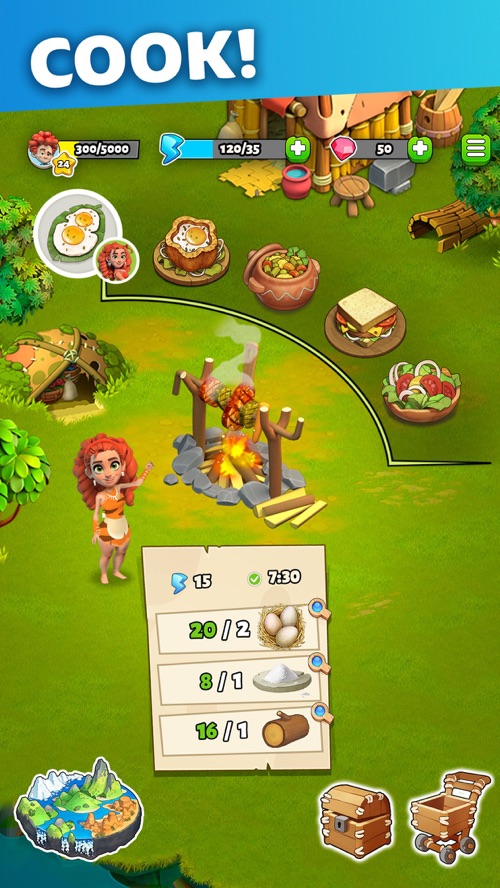
Image: Melsoft, Official App Store listing
Feed your family one step at a time
The table displays dishes prepared on the hearth or on the cooking table, which are used when the family lacks energy. The publisher's help center explains the routine in several steps.
- Open the dinner table.
- Drag the meal from the list to an empty slot.
- Tap the plate icon on the right to tell your family it's time to eat.
- Use the energy you receive.
The Help Center does not disclose the energy value or number of slots for each dish, so it is not disclosed in this guide. Check the numbers for each meal in your own game.
Two messages, two different problems
"The dinner table is full" and "Everyone is full" are similar, but have opposite meanings.
| message | what it means | what to do |
|---|---|---|
| Dinner table is full | All slots already contain dishes | Feed your family and free up space |
| Everyone is full | Your family cannot eat because your energy is above the maximum | Spend energy until the bar is below the cap |
The first message is about food. The second one is about energy bars, and cooking more will not solve the problem.
Worked example: 190/87 bar
The Help Center's own example is a bar that says 190/87. That is, 190 energy against the maximum of 87, so you are 103 points over the limit and your family refuses to eat.
You must be under 87 to feed again. This means spending at least 104 energy (190 minus 86). The Help Center lists three ways to do so: chop resource objects, explore islands, and complete tasks. As soon as the bar falls below the maximum value, the family will become hungry again.
In the meantime, there is nothing holding you back. According to the Help Center, food tasks can wait, and you can continue.
First feed, then collect
If you plan to harvest a large amount of energy, feed your family before harvesting energy. The Help Center lists sources that can exceed the limit, including treasure chests, merchants, shamans, gifts, and energy packages.
Collecting first may push the bar past its maximum value and lock the table, leaving the meals there. Feeding them first while they have room allows them to convert food into energy.
Second reading: Screenshot above
The listing image shows an energy bar of 120/35. The same calculations apply. 120 minus 34 is 86, so you will spend at least 86 energy before the table accepts a meal. The maximum value depends on your progress, so the numbers in the game will vary.
Energy consumption: Power Mode
Power Mode multiplies the resources you cut based on the energy you use, so it's the fastest way to get something while reducing your full bar.
- Tap the number button next to the energy bar to increase the multiplier. The minimum value is 1 and is always available.
- Higher options require sufficient energy in the bar.
- A regular tap at the max multiplier will set it back to 1, and restarting the game will reset it to x1.
- The button only appears on maps where the feature is active.
- It does not apply to island areas, which consume energy without providing resources. Also, gifts and other rewards are not multiplied.
Please check the in-game button as the Help Center does not list the top multiplier.
Dynamite and storage
According to the Dynamite article in the Help Center, placing dynamite in an empty area will give you energy. For resources that require several chops, dynamite will only clear the first layer.
Check storage locations before large collections. Storage has five sections (Basic, Storehouse, Food, Rare and Events), and when full, collected items will fall to the ground and can get stuck behind obstacles such as trees or rocks. Upgrading the Stone, Food, Wood or Storehouse Storage buildings on your Home Island adds space.
Next steps
Stock the table, feed before opening the chest, and read the message on the plate before cooking. For information on energy sources outside the table, please see the Family Island Companion Guide on Energy Sources and Events. For current free energy, please open Family Island reward links page. The official dinner table help article describes the original steps, and How Rewavio lists official links explains where the reward link on that page came from.